
🎵 Media controls
Overview
- Media controls automatically appear on the 4th (bottom) row of the Parrot Assistant panel when audio or video is detected 🎬
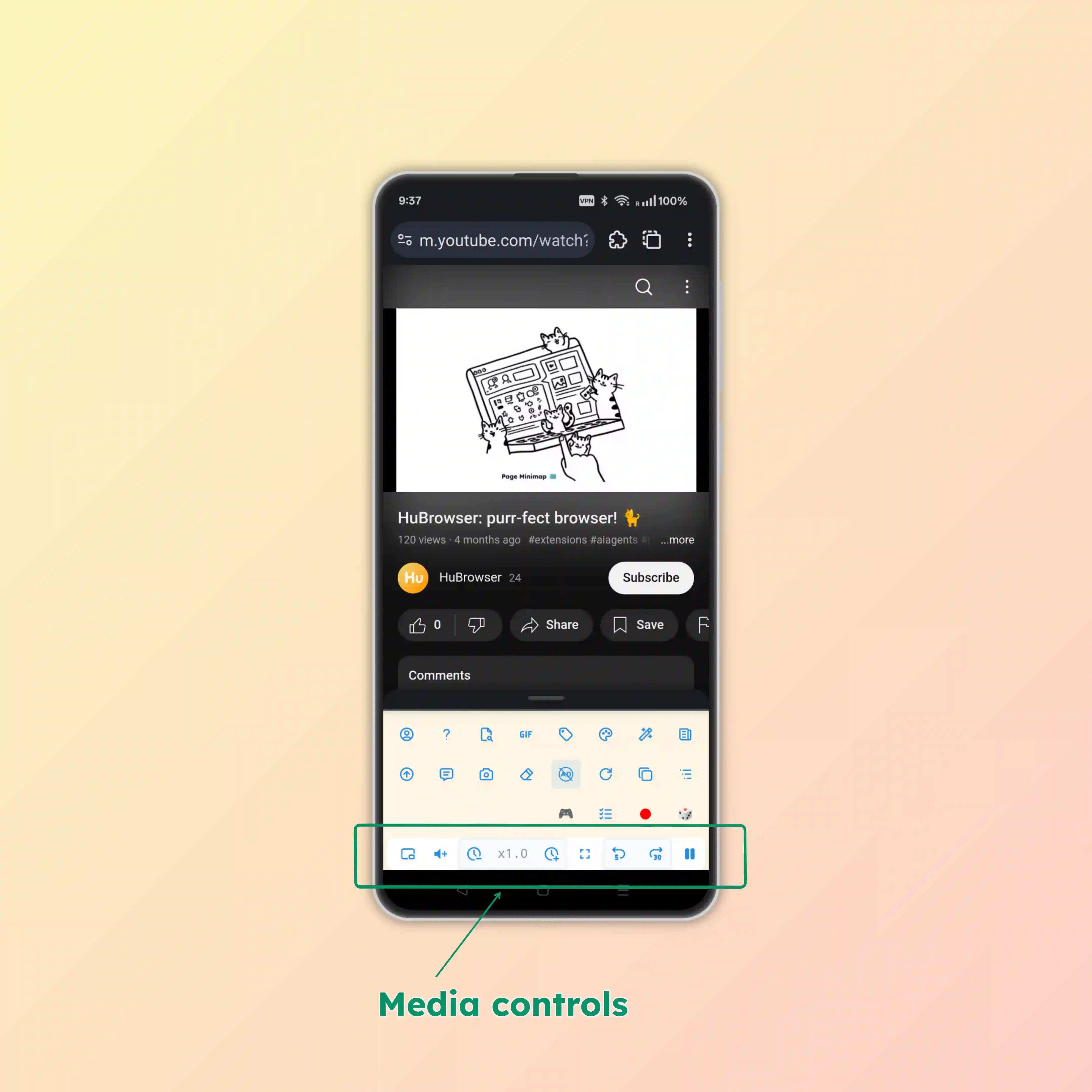
🎬 Live demo
See HuBrowser's media controls in action:
🎛️ Controls guide
The media control row contains these buttons (from right to left):
▶️ Play/Pause
- Start, resume, or pause playback with one tap
⏩ Forward
- Skip forward 30s: Move ahead to skip intros or silent gaps
↩️ Rewind
- Jump back 5s: Quickly re-listen or re-watch the last few moments
🖼️ Fullscreen
- Enter / Exit Fullscreen: Expand the active video to fill the screen for an immersive view
- Smart Escape: Exiting fullscreen returns you smoothly to the exact scroll position
- Multi-Display Friendly: Works even when the video element itself doesn't expose a fullscreen button
⏱️ Speed controls
- Speed indicator (e.g. 1.2×): Shows current speed
- Tap to open speed slider
- Tap or click +/− to adjust in 0.1× steps
🔊 Volume boost (up to 10×!)
- Too quiet even at device volume max? HuBrowser's audio engine scales volume up to 10× 😎!
- Tap to open the volume slider
- Granular Steps: Boost increments are intentional — you'll feel a clear difference without sudden jumps
⋯ More actions panel (⋯)
⬇️ Download
- Short tap the download button: Start a quick download right away
- Long press the download button: Start system-level media recording when a direct download isn't practical
💎 Premium feature, free for a limited time
Download is a premium feature and is currently free for a limited time.
🖥️ Picture-in-Picture
- Toggle Picture-in-Picture: Float the video over other windows for easy multitasking
🎬 Frame-by-Frame
- Next frame ➡️
- Previous frame ⬅️
☀️ Brightness
- Adjust Brightness: Increase or decrease video brightness for optimal viewing
- Click the sun icon to reset
🎯 Seek bar
- Drag to Seek: Quickly navigate to any point in the video
⌨️ Hotkeys
If you prefer keyboard control, you can use these shortcuts directly:
k: Play or pausej: Rewindl: Fast forward<and>: Adjust playback speedf: Toggle fullscreen
🧠 Smart features
- 🎯 Auto-Detection: Controls appear automatically when media starts playing
- 🌐 Broad Support: Works on phones, tablets, and desktops
- 💡 Context-Aware: Each button controls the currently active player
- ⚡ Quick Access: No need to hunt for tiny in-player controls, and avoid accidentally triggering ads
🎯 Benefits
- 🚀 Faster Control: No need to hunt for tiny player buttons
- 📱 Mobile-Friendly: Large, touch-friendly buttons perfect for mobile browsing
- 🎯 Always Accessible: Controls stay visible even when scrolling or switching focus
- 🔧 Consistent Interface: Same control layout across all websites and media types